Template · Mixed-use property brochure
Mixed-use property brochure and OM template
A mixed-use building is two or three investments under one roof: shops or restaurants at grade, and apartments or offices above. Buyers underwrite each part separately, then ask how they work together, so the marketing has to split the income, the tenancy and the rules that apply to each component.
This template builds a brochure, or a full OM, that does that from your rent roll and fact sheet: an investment summary for sale listings, the commercial rent roll at a glance, a residential unit mix, zoning and permitted uses, and the transit, amenities and population that support both kinds of tenant.
Best for
- Main-street buildings with retail at grade and apartments above
- Retail and office mixed-use buildings
- Small mixed-use portfolios and corner properties sold as investments
What you need
- A rent roll for the commercial units and a suite list for the residential floors
- Operating statement or income and expenses by component
- Photos of the frontage, the storefronts, common areas and typical suites
Upload a fact sheet (PDF, Word, image or a phone photo of a flyer), paste its text, or start from the address. Extracted facts are marked “verify” until you accept them.
What’s inside
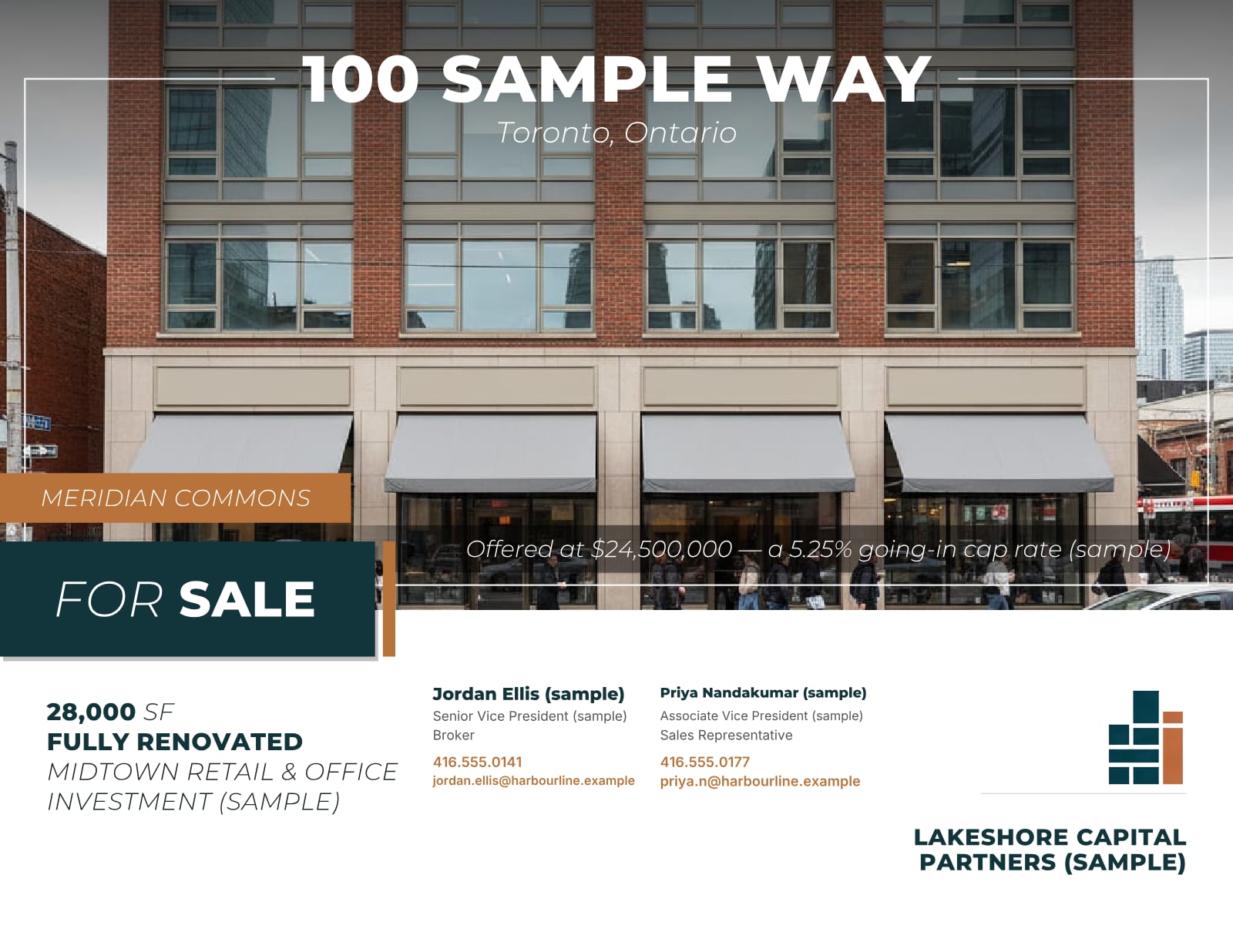
- CoverHero photo of the frontage, transaction title, offer line and the listing team.
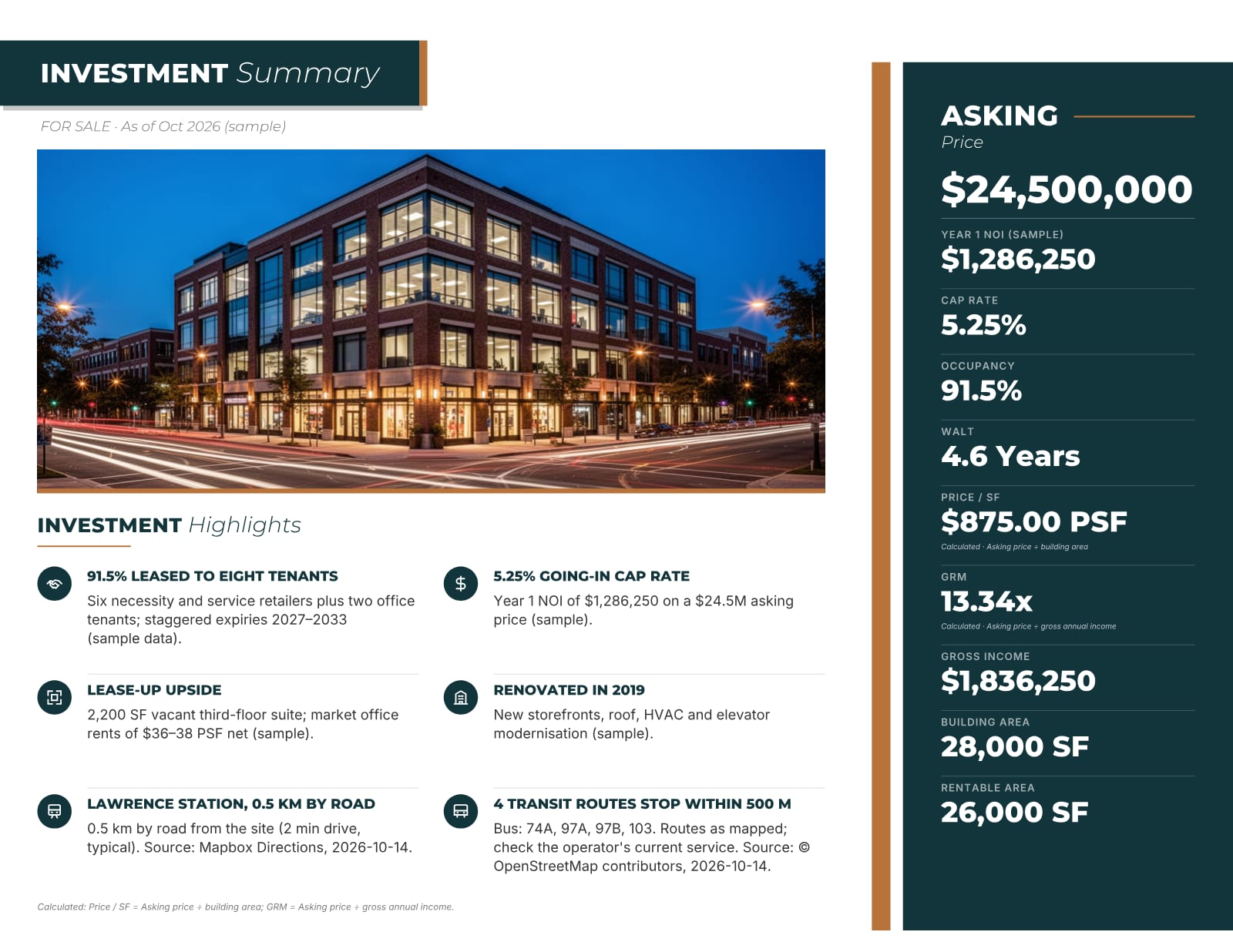
- Investment summary (for sale)Asking price, NOI, cap rate, occupancy and WALT, with calculated values labelled.
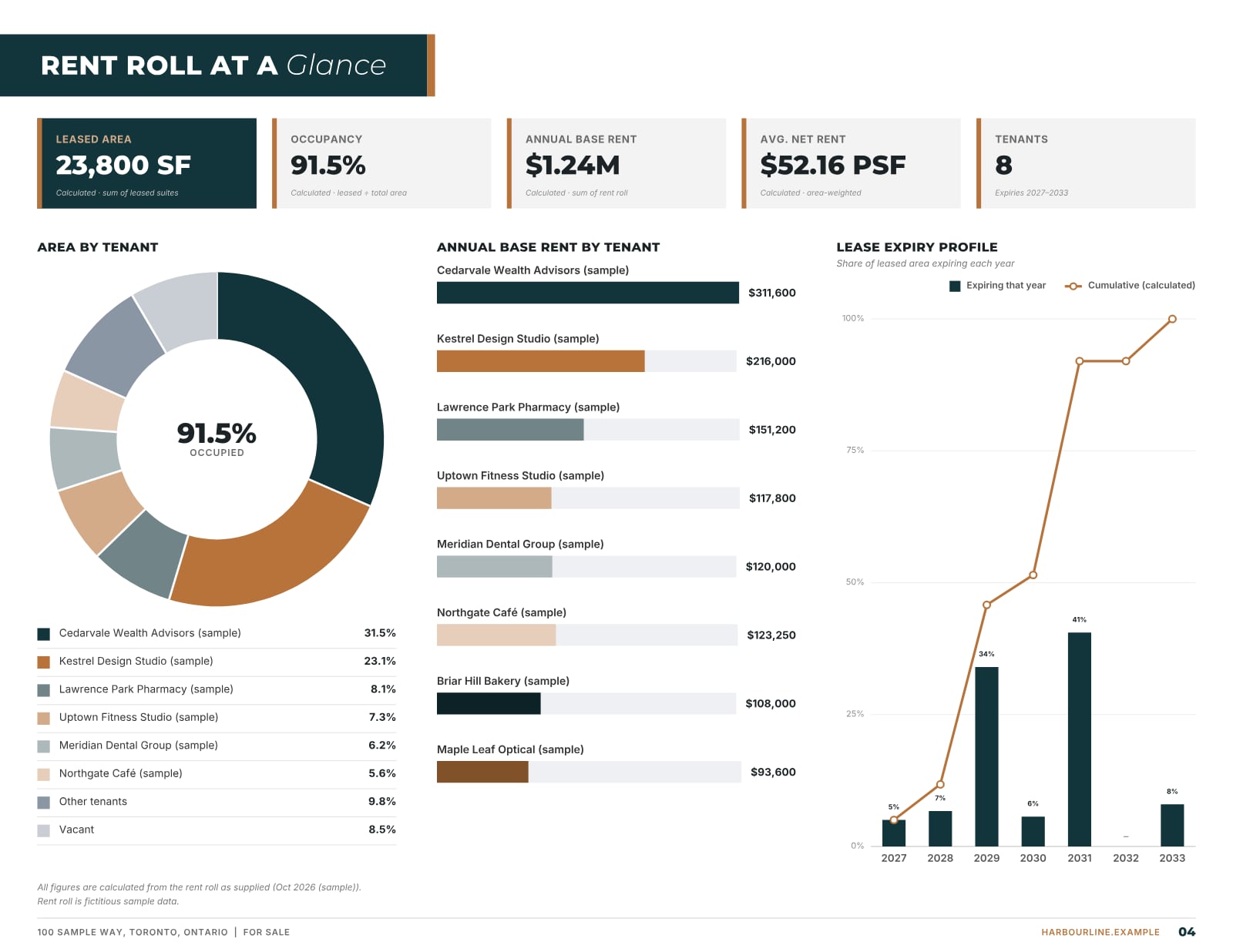
- Rent roll at a glanceArea by tenant, rent by tenant and the lease expiry profile when two or more commercial units are leased.
- Tenancy and unit mixThe commercial rent roll and, for residential floors, one row per suite type with counts and rents.
- ZoningZone code, the permitted uses that matter for each component and key controls, with sources.
- Transit and drive timesStations, routes and drive-time areas, sourced and dated.
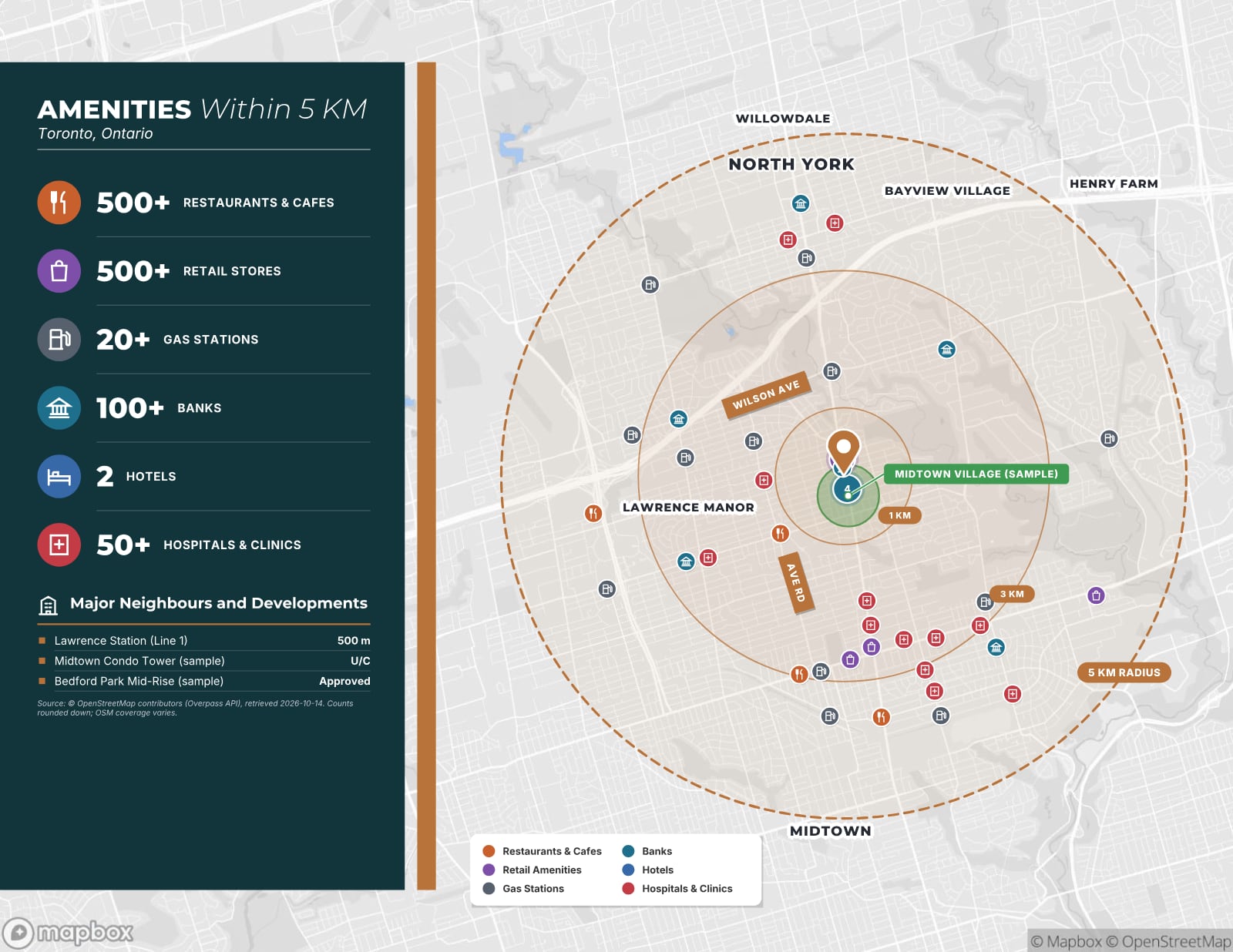
- Amenities and trade areaAmenity counts around the property from OpenStreetMap and, for Canadian properties, population and households in 1, 3 and 5 km rings.
- Demographics, photos and contactsPopulation and labour force with source and year, a photo spread and the listing team.
What buyers check first
- Income by componentCommercial and residential rent shown separately, so each can be valued on its own terms.
- Commercial leasesTenants, areas, rents, lease type (net or gross), expiries and options for every storefront.
- Residential suites and rent rulesUnit mix, in-place and market rents, and the residential tenancy rules that apply.
- Recoveries and shared costsWhich costs the commercial tenants pay back and how shared costs are split between components.
- Zoning and permitted usesWhat the zone allows at grade and above, and any non-conforming uses.
- Financing fitThe commercial share of income and area, which affects which lenders and programs will finance it.
Two buyers in one building
A residential investor looks at the suites, the rent gap and the tenancy rules; a retail investor looks at the storefront tenants, their lease terms and the street. A mixed-use brochure works when each of them can find their numbers in under a minute. Split the income into commercial and residential lines, show occupancy for each, and keep the residential unit mix separate from the commercial rent roll.
Then make the case for the whole: how the retail serves the residents, how foot traffic supports the storefronts, and whether there is room to add value by re-leasing, renovating suites or adding density where the zoning allows it. Be specific: name the storefront leases that expire in the next three years, the suites below market and the controls that would permit another storey, so the buyer can test each idea against the facts.
Leases and rent rules that apply to each part
The commercial units are governed by their leases. Say whether each is net or gross, what the tenant pays toward taxes, insurance and common costs (in Canada often called TMI or additional rent), and when each lease expires, with renewal options. The residential suites are governed by the provincial or state residential tenancy rules, including any rent increase limits, so describe what the seller understands applies and recommend buyers confirm it with counsel.
Shared costs deserve a sentence of their own. If utilities, property tax or maintenance are split between the commercial and residential parts, explain the method, because it changes the NOI of each component.
Financing and valuation
Lenders look at the mix. Insured and agency multifamily programs in Canada and the US limit the share of commercial space or income they will accept, while commercial lenders may treat a building with only a few apartments as retail. You don’t need to give financing advice, but showing the commercial and residential shares of area and income lets a buyer’s mortgage broker answer quickly.
- Cap rate on the total NOI, with its basis and date.
- Price per square foot of building area, and price per residential suite where suites carry most of the value.
- Commercial rents per square foot against the street, and residential rents against the neighbourhood, each with sources.
Photos, street and location
Mixed-use buildings sell on the street as much as on the numbers. Show the frontage from across the road at a busy time of day, each storefront with its signage, the residential entrance, a typical renovated and unrenovated suite, the rear lane, parking and the mechanical room, and date each photo. If the building sits on a corner or a transit line, an aerial that shows the intersection and the station explains the location faster than a paragraph.
Location data should serve both tenant groups. For the retail, show transit stops, nearby anchors and the population within walking and short driving distance; for the apartments, show grocery, schools, parks and the commute to major employment areas. Use official census figures with their source and year, and leave out claims a buyer cannot check, such as unsourced foot-traffic counts.
Building it in OfferingStack
Upload the rent roll and fact sheet, or start from the address. For a sale listing with income, OfferingStack adds an Investment Summary page after the cover; with two or more leased commercial units it adds a Rent Roll at a Glance infographic; residential suites go on a Unit Mix page. Zoning, transit, amenity and demographic pages are built from sourced data, and for Canadian properties a Trade Area table shows population and households in 1, 3 and 5 km rings.
Pages without data are left out rather than shown empty, and the sample above is a fictitious mixed-use property rendered by the product, labelled as a sample.
Real pages from the product
Sample — fictitious property. Pages generated by the product for “Meridian Commons, 100 Sample Way”, a mixed-use sample with an invented name, address and brands. Every figure marked (sample) is not real.
See a sample for your property type
Fictitious properties, each labelled as a sample.
- RetailPlazas, strip centres and street retailSample on the wayRetail
- MultifamilyApartment buildings and rental communitiesSample on the wayMultifamily
Questions
Can I show commercial and residential income separately?
Yes. Enter the commercial tenants in the rent roll and the residential suites in the unit mix; the financial pages show the income lines you enter, each labelled with its basis.
Does the investment summary appear on a lease brochure?
No. The Investment Summary page is added for properties offered for sale with income data. A lease brochure leads with availability and property details.
What if the building has only one or two storefronts?
The Rent Roll at a Glance infographic needs at least two leased units; with fewer, the tenancy table carries the details and the infographic is left out.
Does it work for US mixed-use buildings?
Yes. Properties anywhere in Canada or the United States are supported, with figures in CAD or USD and demographics from the US Census Bureau ACS for US properties.
Can I see a real mixed-use sample?
Yes. The pages shown here were generated by the product for a fictitious mixed-use property with invented names and figures, labelled as a sample.
Start with the fact sheet you already have.
Upload it, answer only what’s missing for the output you choose, and review a watermarked preview before you buy anything.