Property-type template
Mixed-use offering memorandum template for retail with residential or office above
A mixed-use building is two or three investments under one roof, and the buyer underwrites each one differently: apartments on rents and turnover, shops and offices on leases and covenant. A mixed-use offering memorandum keeps the uses apart where the buyer needs them apart, and adds them up where the price depends on the total.
Sample pages
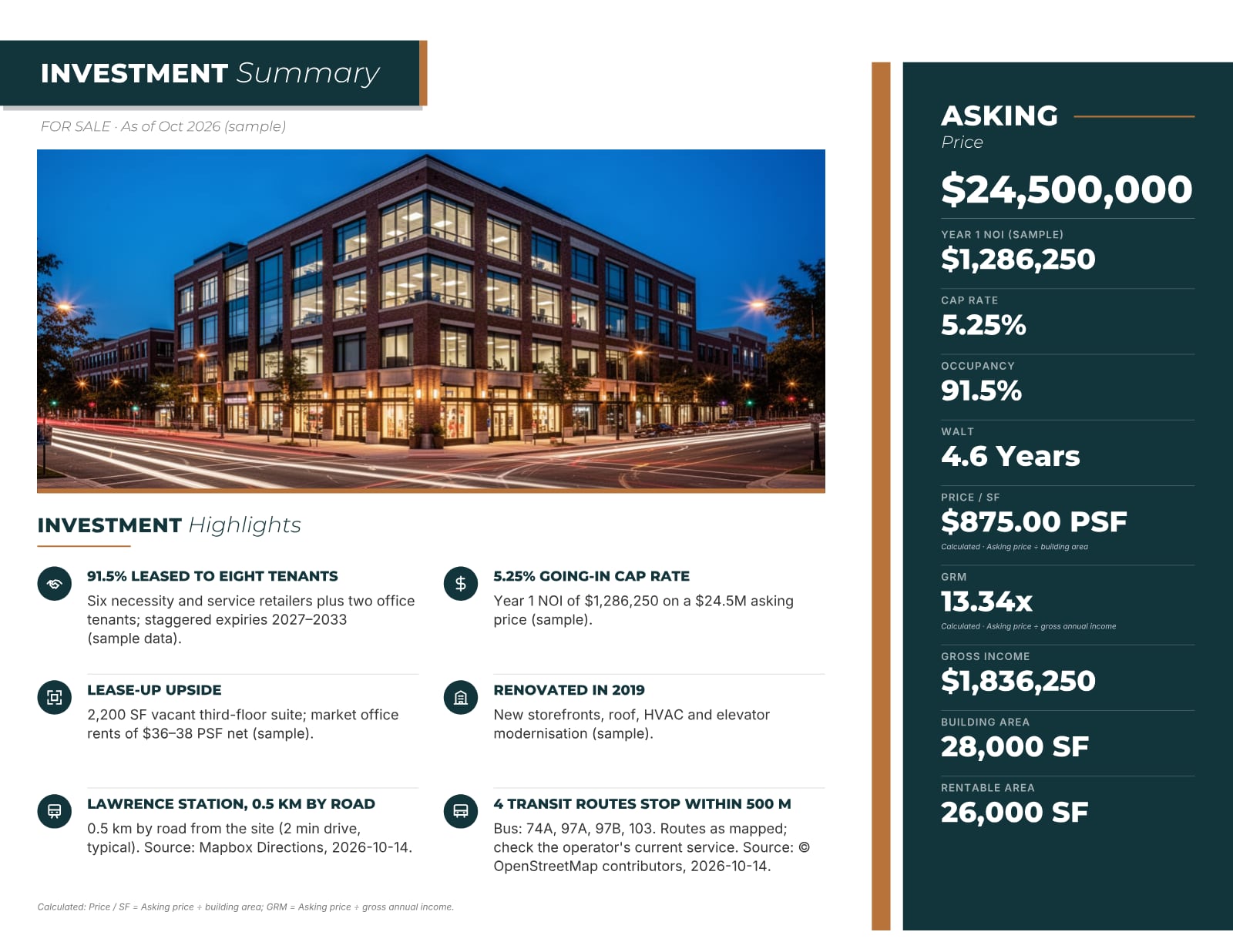
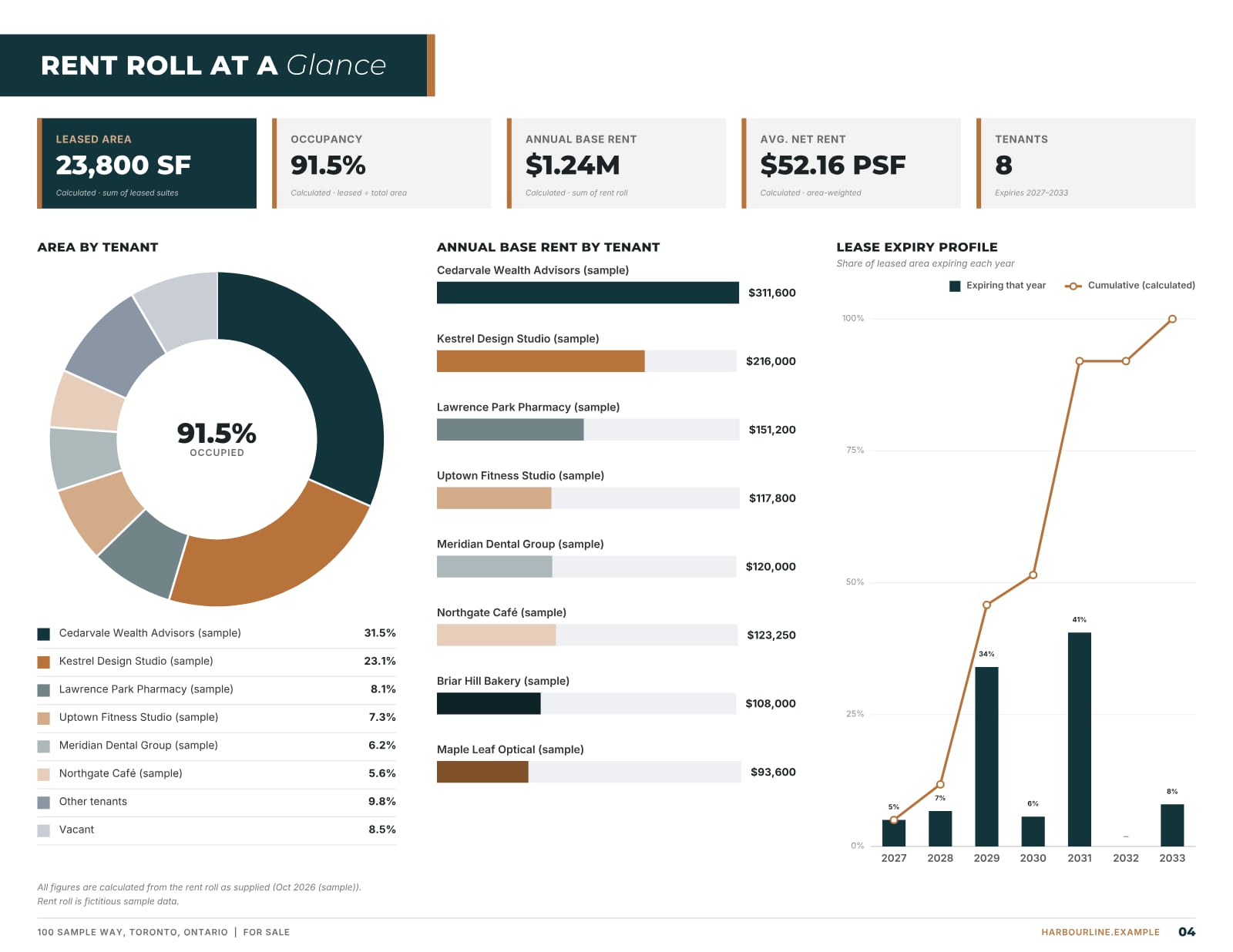
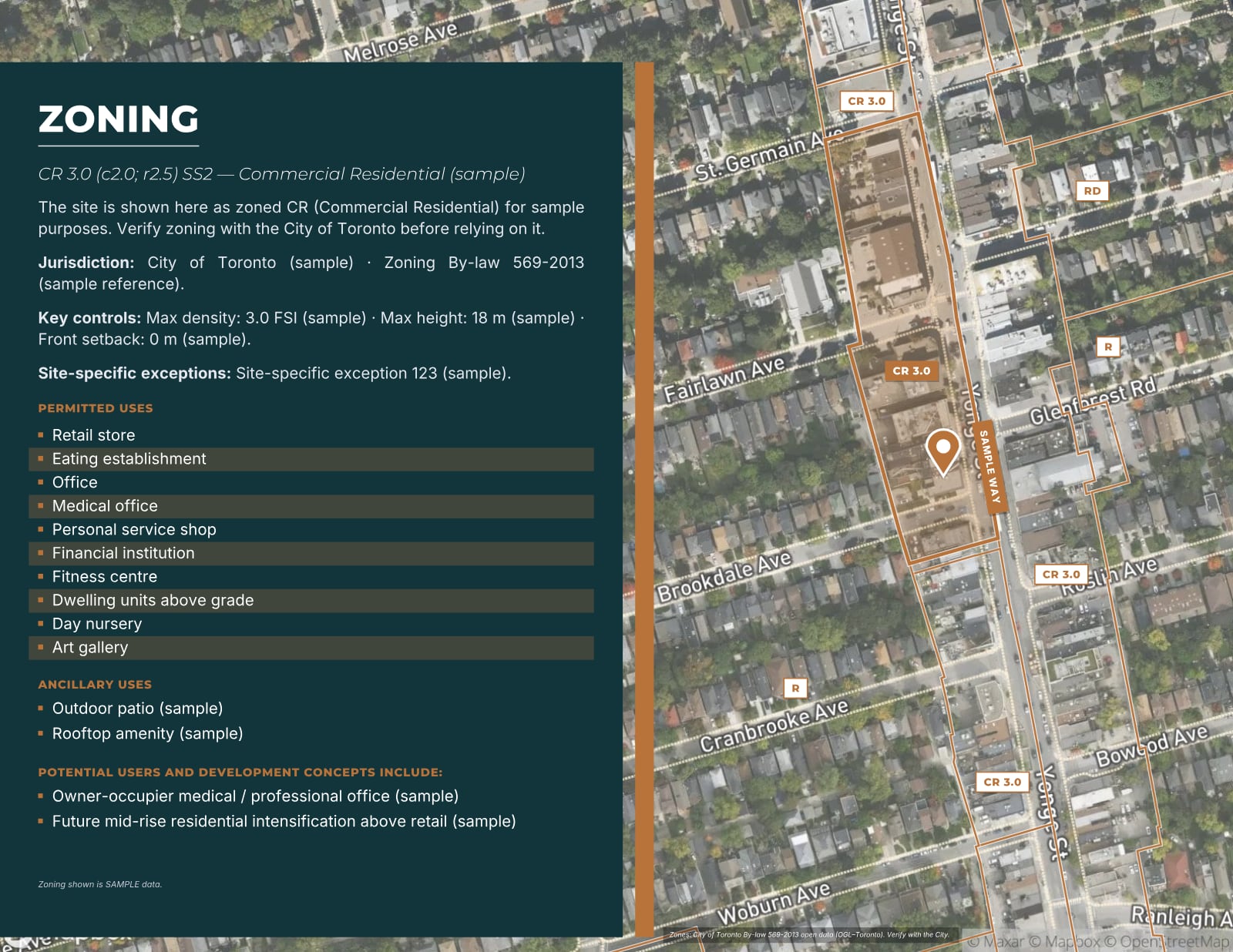
Sample — fictitious property. These pages come from a mixed-use BROCHURE generated by the product for “Meridian Commons” (invented name, address and brands); no mixed-use full OM sample has been rendered yet. The full OM prints these pages and the financial pages listed below.
Pages in a mixed-use offering memorandum
- Cover, executive summary and investment highlights: the building in one paragraph and the reasons to buy, written from your facts.
- Investment summary: asking price, NOI, cap rate, occupancy and WALT, for a sale with income. Calculated values are labelled.
- Unit mix: one row per apartment type with count, average size and in-place and market rent.
- Tenancy and rent roll: the commercial leases, split across pages when the roll is long, with a rent roll at a glance chart.
- Mixed-use income mix: how the income splits between residential and commercial, when the listing has a residential unit mix with in-place rents and at least two leased commercial units with rent.
- Financial overview, 10-year cash flow and capital expenditures: income to NOI, a cash flow when you enter one, and capital work when you list two or more items.
- Pricing, valuation and financing: implied value across cap rates and illustrative financing, each labelled as calculated.
- Zoning: the designation and permitted uses with sources, which matters when the ground floor could change use.
- Location, drive times, amenities and trade area: transit, daily needs and residents within 1, 3 and 5 km or miles, from census tables.
- Sources and references, then your contacts.
What mixed-use buyers check first
- The income split: how much of the rent comes from apartments and how much from commercial leases.
- Residential upside: in-place rents against market rents, unit by unit type.
- Commercial risk: lease expiries, who the ground-floor tenants are and what the space could be re-let for.
- Expenses and recoveries: what commercial tenants pay back, and what the owner carries for the apartments.
- Zoning and the street: what the ground floor may be used for and who walks past it.
One building, two kinds of tenancy
Put the apartment figures in the unit mix and the shop and office leases in the rent roll. The document then shows each use the way a buyer of that use expects, and adds them together only on the financial and pricing pages.
What to bring
- A residential unit list or unit mix with in-place and market rents
- A commercial rent roll with suite, tenant, area, rent and expiry
- Operating statement or trailing 12 months of income and expenses
- Photos of the frontage, the commercial units, common areas and a typical apartment
How it works
- Upload a fact sheet (PDF, Word, Excel, an image or a phone photo of a flyer), paste its text, or start from the address. Every extracted fact shows the page and words it came from and is marked “verify” until you accept it.
- Choose the full offering memorandum. Pages print only when the listing has the data for them, so a short mixed-use listing is shorter rather than padded with empty boxes.
- Add, remove and reorder pages, then review a watermarked preview of your own listing before you buy anything.
Common questions
- Can the residential and commercial income be shown separately?
- Yes. Apartments go in the unit mix and commercial leases in the rent roll, and the income mix page shows the split when both carry rents.
- Is there a mixed-use OM sample?
- Not yet. The sample pages on this page come from a mixed-use brochure made by the same engine, and are labelled as a fictitious property.
- Does it make a shorter brochure from the same file?
- Yes. The teaser, brochure and full OM all come from the same property file.
- Can I edit the OM in PowerPoint?
- Yes. A paid document can be downloaded as a PDF and as an editable PowerPoint (.pptx) file, so you or your designer can adjust any page after it is built.
- Can I see it before I pay?
- Every account can make one watermarked preview of its own listing and review the pages before buying anything.
Related pages
- Mixed-use brochure example
- Mixed-use property brochure template
- Multifamily OM template
- Retail plaza OM template
- Apartment building OMs
- Operating statement and NOI
- Rent rolls and lease abstracts
- Unit mix average rent calculator
- Cap rate calculator
- NOI calculator
By property type: Land · Hotel · Self-storage · Seniors housing · Parking · Sublease
By city: Toronto · Chicago · Vancouver · Seattle · Calgary · Denver · Montreal · Boston
Guides: All guides · All templates · Sample pages · Pricing
See your own building as a mixed-use OM.
Upload your rent roll and unit list, and review a watermarked preview of your pages before you buy anything.