CRE marketing guide
How to write a commercial listing email blast
The anatomy of an email that announces a commercial listing: subject line, hero image, highlights, one call to action, and the CASL basics in Canada.
What the email is for
A listing email has one job: get the right people to take the next step, which is usually opening the brochure, signing a confidentiality agreement or calling the listing broker. It is not the brochure. Readers decide in a few seconds whether a property is worth their time, so the email should give them just enough to decide and make the next step obvious.
The subject line
The subject line decides whether the email is opened. For commercial listings, specific beats clever. Include the transaction, the property type, the size and the location:
- “For sale: 42,000 sf industrial building, Concord”
- “For lease: 3,200 sf retail unit at Yonge & Lawrence”
- “Offering: 9.4-acre serviced employment land, Hamilton”
Avoid capital letters, exclamation marks and words such as “exclusive” or “rare” that add nothing and can trigger spam filters. Keep it short enough to read on a phone. The preview text, the line that shows after the subject in most inboxes, should add the next most useful fact, such as the price, the offer date or a key specification.
The structure that works
- Header: the brokerage logo, small.
- Hero image: one strong photo or aerial of the actual property, with descriptive alt text for readers who block images.
- Headline: the same facts as the subject line, stated plainly.
- Three to five highlights: specific, verifiable facts such as site area, clear height, zoning, tenancy or drive time to the nearest highway.
- Key figures: price or offering process, area, availability, in a simple two-column block.
- One call to action: a single button, such as “View the brochure” or “Sign the confidentiality agreement”.
- Contact block: the listing brokers’ names, phone numbers and email addresses.
- Footer: the brokerage’s legal name and address, a disclaimer, and an unsubscribe link.
One call to action matters more than it looks. Several competing buttons split attention, and readers who are not sure what to click often click nothing.
Writing the highlights
The highlights should be the same verified facts that appear in the brochure, shortened. “Minutes to Highway 400” is weaker than the actual drive time. “Excellent exposure” is weaker than the frontage and the traffic context. If a figure is calculated, such as a price per square foot, label it the same way you do in the brochure.
Keep every figure consistent with the brochure and the offering memorandum. Readers forward these emails, and a price or area that differs between documents raises questions you do not want.
Design and deliverability
Most commercial readers will open the email on a phone at least once. Use a single column, a readable font size, and a button large enough to tap. Keep the email light: one optimized hero image rather than a gallery, and link to the brochure rather than attaching a large PDF, which many corporate mail servers block or strip.
Send a test to yourself and a colleague on different email apps and phones before the real send. Check that every link works, the images load, and the text still makes sense with images turned off.
CASL basics in Canada
Commercial electronic messages sent to or from Canada are subject to Canada’s Anti-Spam Legislation (CASL). In general terms, it requires that you have consent to send the message (express or, in limited situations, implied), that the message identifies the sender with contact information, and that it includes a working unsubscribe mechanism that is honoured promptly. Implied consent from an existing business relationship has time limits.
This is a summary, not legal advice. The Canadian Radio-television and Telecommunications Commission (CRTC) publishes guidance on CASL, and your brokerage will have its own policy. Use your brokerage’s email platform and lists, which are usually set up to handle consent records and unsubscribes.
Sending a lease email vs a sale email
Lease and sale announcements reach different readers. A leasing email goes to tenant-representation brokers and businesses that might need space, so lead with the available area, the asking net rent and additional rent, and the availability date. A sale email goes to investors, owner-users and developers, so lead with the price or offering process, the site and building areas and the tenancy. If you market the same property both ways, send two emails to two lists rather than one email that tries to do both.
For an unpriced offering, the email should say so plainly and give the offer date or the next step in the process. Readers who cannot find a price and cannot see a process tend to assume the vendor is not serious.
Building and keeping the list
The best list for a commercial listing is usually your own: buyers, tenants and co-operating brokers you have dealt with, who have agreed to hear from you. Record when and how each person gave consent, keep notes on what type of property they are looking for, and segment the list so an industrial investor does not receive every retail leasing email. Remove addresses that bounce and honour every unsubscribe. A smaller, well-kept list produces more replies than a large one that recipients have learned to ignore.
Timing and follow-up
Send the full launch email on the same day the listing appears elsewhere, so recipients do not see it first on a listing service. Many brokers send to a short list of the most likely buyers a few days earlier. A single reminder before an offer date is useful; repeated sends of the same email to the same list usually are not.
Track what happens next: replies, brochure views and confidentiality agreements signed. Those numbers are more useful to the vendor than open rates.
Follow-up emails that add something
A second email is worth sending only when there is something new to say: a price change, a newly available unit, a confirmed offer date, a completed environmental report in the data room, or a lease signed that changes the income. Lead with the change in the subject line, repeat the key facts briefly, and keep the same call to action. When the property sells or leases, a short “sold” or “leased” note to the same list closes the loop, shows activity in the market and reminds readers to call you about the next one.
A pre-send checklist
- Subject line states transaction, type, size and location.
- Hero image is the actual property, with alt text.
- Highlights and figures match the brochure exactly.
- One call to action, and its link works.
- Contact details are correct and clickable on a phone.
- Disclaimer and sender identification are present.
- Unsubscribe link works.
- The list has consent under CASL and your brokerage’s policy.
- Tested on at least two email apps and a phone.
How OfferingStack helps
OfferingStack can generate a listing email from the same property file as the brochure, so the highlights and figures match. It suggests subject lines, uses the property’s own images with absolute links, offers a single call to action pointing to the listing web page or web viewer, and includes a footer slot for your brokerage’s sender details, disclaimer and unsubscribe link. You copy the HTML into your brokerage’s email platform and send from there.
What these pages look like
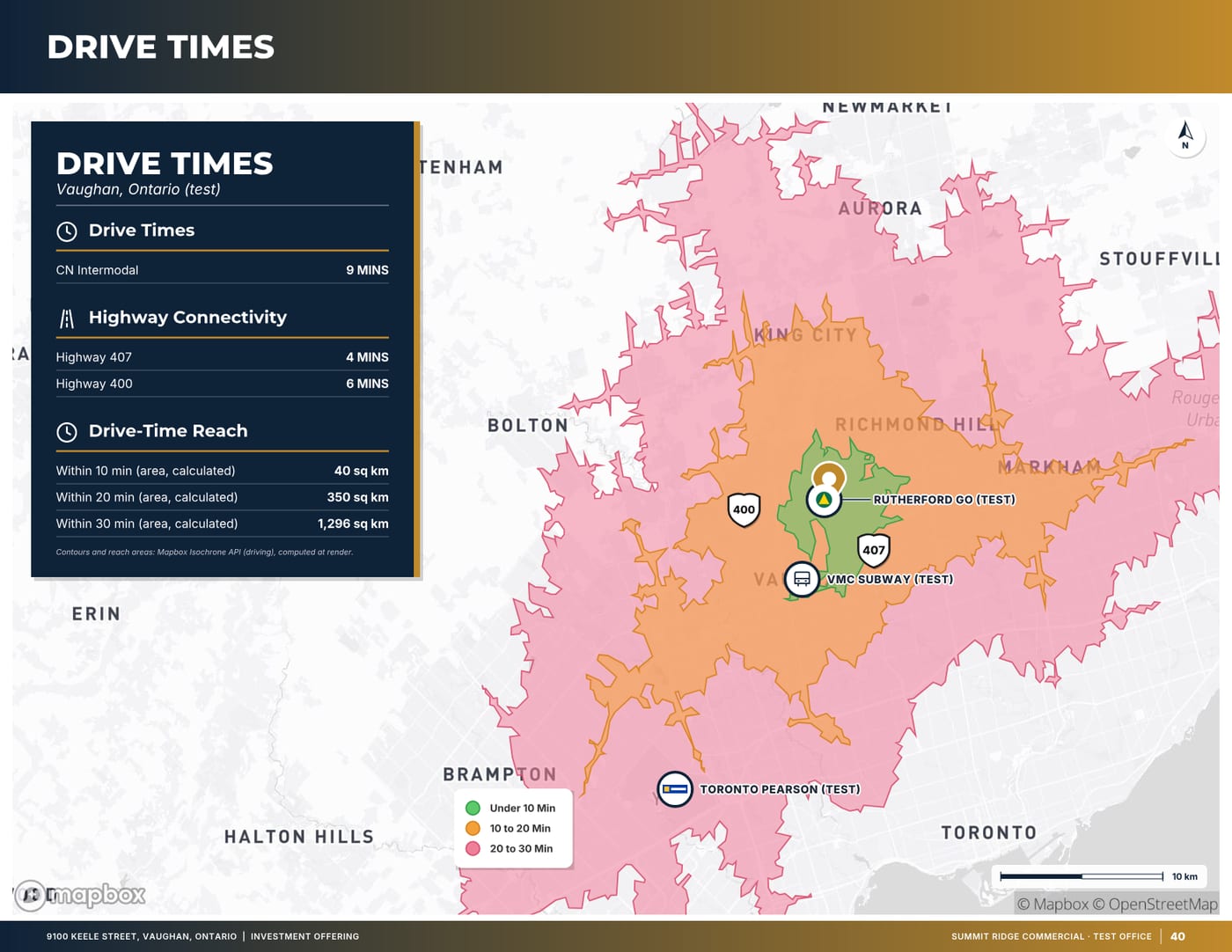
Sample pages are generated by the product from a fictitious test listing (9100 Keele Street, "Summit Ridge Commercial" test brand). Figures marked (test) are not real.

Related
Last updated 2026-10-14. General information for commercial real estate professionals, not legal advice.
Start with the fact sheet you already have.
Upload it, answer only what’s missing for the output you choose, and review a watermarked preview before you buy anything.