CRE marketing guide
How to write a commercial listing description (MLS remarks, brochure copy and portals)
How to write commercial property descriptions: what to lead with, wording specs and money, MLS remarks vs brochure copy, and mistakes that cost enquiries.
What a listing description has to do
A commercial listing description is read by people who are screening, not browsing. A tenant-rep broker scanning MLS, an investor flicking through a portal or a lender skimming a brochure wants to know in a few seconds whether the property fits their criteria. The description’s job is to answer that quickly and accurately, then give them a reason to ask for the full package.
That means the best descriptions are specific rather than enthusiastic. “Freestanding 42,000 sq ft industrial building, 28 ft clear, 6 truck-level doors, 4 minutes to Highway 401” tells a qualified reader more than a paragraph about a “fantastic opportunity in a prime location”. Adjectives are cheap; facts are what get a property onto a shortlist.
Lead with the deal, then the property
Open with one sentence that says what is being offered and to whom: the transaction (for sale, for lease, sublease), the asset type, the size and the place. Then add the single most important differentiator. For an investment sale that may be the tenancy or the income; for a user sale it may be the building specification; for a retail lease it may be the co-tenancy or the frontage.
- Transaction and asset type: “For sale: multi-tenant retail plaza”.
- Size, using the right measure: building area, rentable area, site area, or units available.
- Location in terms the market uses: municipality, node, intersection, highway access.
- The differentiator: the one fact a competing listing cannot claim.
- The call to action: how to get the brochure, OM, data room or a tour.
Everything else (secondary specs, the area story, amenities) belongs after this opening, or in the brochure itself.
Write specifications the way the market reads them
Use the units and terms your buyers use, and use them consistently between the description, the brochure and the MLS fields. In Canada that often means square feet for buildings and acres for land, with metric equivalents where your audience expects them. Do not mix gross and rentable areas without saying which is which, and say whether a site area is gross or net of road widenings or easements when you know it.
For industrial listings, the clear height, door counts by type, power and sprinkler system carry most of the weight; our guide to industrial building specs covers how to word each one. For office and retail, give the floor or unit sizes available, parking, frontage and exposure, and the permitted uses that matter to the likely tenants. For land, lead with the area, zoning and servicing status.
Money: be exact or be quiet
Price, rent and income figures are where descriptions most often get a listing into trouble. If you publish an asking price, state it exactly as instructed by the client and include the basis (for example “plus HST if applicable” when that is the agreed wording). For leases, say whether the rent is net and give the additional rent (TMI or CAM) estimate and its year when you have it.
For investment properties, quote NOI or a cap rate only if the client has approved releasing it and you can show the calculation in the OM. Many brokers deliberately leave income out of public remarks and offer it after a confidentiality agreement; that is a perfectly good strategy, and better than publishing a figure you later have to correct.
MLS remarks vs brochure copy vs portal listings
The same facts appear in several places, but each format has different constraints.
MLS remarks
Board systems have their own field rules, character limits and policies on what may appear in public versus broker-only remarks, and these differ between boards. Check your board’s rules before you write. Keep public remarks factual and put showing instructions, commission details and confidential notes only in the fields intended for them.
Brochure and OM copy
A brochure has room for a short narrative: why the property works, who it suits and what the area offers. Keep paragraphs short and let the spec block, maps and photos carry the detail. In an OM, the executive summary and investment highlights do this job; see our guide on writing investment highlights.
Portals, websites and email
Portal and website descriptions are often truncated in search results and previews, so the first sentence must stand on its own. In email, the subject line and the first two lines do most of the work; our email blast guide has a structure that works for listing launches.
A simple structure you can reuse
- Sentence 1: transaction, asset type, size, location.
- Sentence 2: the differentiator, stated as a fact.
- Sentences 3–4: the key specifications or tenancy facts, in the market’s units.
- Sentence 5: the area in one line (highway access, transit, neighbouring occupiers or amenities).
- Close: what is available on request (brochure, OM, data room, tours) and who to contact.
Write it once, check it against the source documents, and reuse the same facts everywhere. When the price or an area changes, update every place it appears on the same day.
Example openings by property type
The examples below are invented to show the structure; replace every figure with your own verified facts.
- Industrial for sale: “For sale: freestanding 42,000 sq ft industrial building on 2.6 acres, 28 ft clear, 6 truck-level and 2 drive-in doors, minutes from a 400-series highway. Brochure and building data available on request.”
- Retail for lease: “For lease: 1,850 sq ft end-cap unit in a grocery-anchored plaza with signalized access and pylon signage. Net rent plus TMI; floor plan and co-tenancy list on request.”
- Office for lease: “For lease: full 9,600 sq ft floor with 14 private offices and a boardroom, steps from rapid transit, with on-site parking. Available for occupancy after a short fixturing period.”
- Development land: “For sale: 11.4 acres zoned for employment uses with full municipal services at the lot line. Survey, zoning summary and concept plan available after a confidentiality agreement.”
Notice that each one names the transaction, the size, one or two decisive facts and what the reader can ask for next, in about forty words.
Compliance and accuracy notes for Ontario brokers
Listing advertising in Ontario is subject to the Trust in Real Estate Services Act, 2002 (TRESA) and its Code of Ethics, which RECO administers; among other things, advertising must identify the brokerage clearly and must not be misleading. If you send the description by email to people who have not asked for it, Canada’s anti-spam legislation (CASL) applies to the message. This is general information, not legal advice; check RECO’s current guidance and your brokerage’s policies.
Accuracy is the practical side of compliance. Take every figure from a document you can point to (the client’s rent roll, a survey, the zoning by-law, the landlord’s building data) and keep a note of where it came from.
How OfferingStack helps
In OfferingStack you enter the listing facts once and every output reads the same record: the teaser, brochure and OM pages, the email blast (with three subject-line options), the listing website, and an MLS fields sheet that groups your facts the way MLS forms ask for them, with copy buttons, a list of missing fields and a CSV export. When you correct a figure, it changes everywhere on the next render. You still write, review and approve the final wording before anything is published.
Common mistakes
- Opening with adjectives instead of the transaction, size and location.
- Different areas or prices in the MLS, the brochure and the website.
- Publishing income figures the client has not approved for release.
- Quoting peak clear height or gross area without saying so.
- Leaving the brokerage name or contact details out of an advertisement.
- Copying a previous listing’s remarks and forgetting to update the details.
What these pages look like
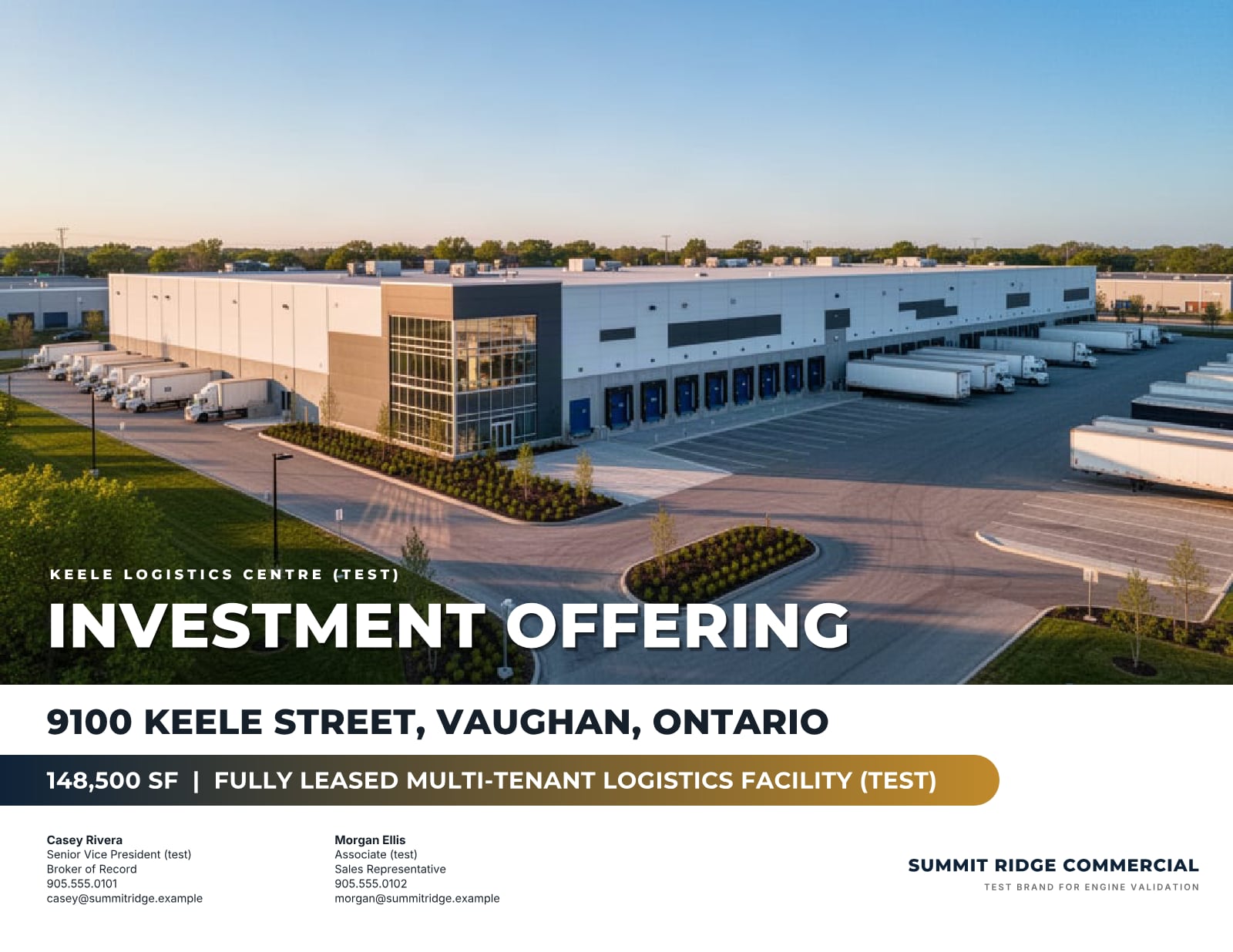
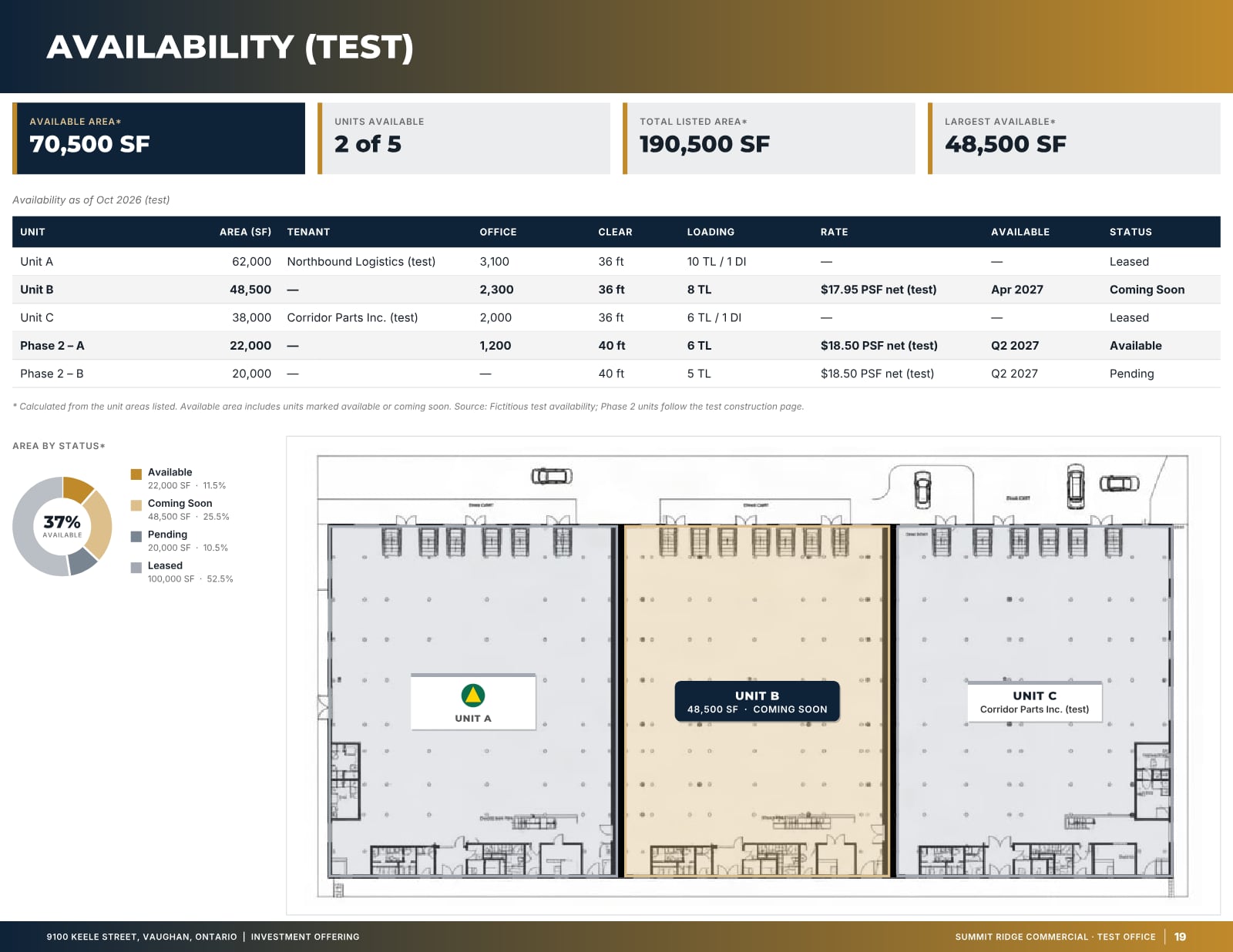
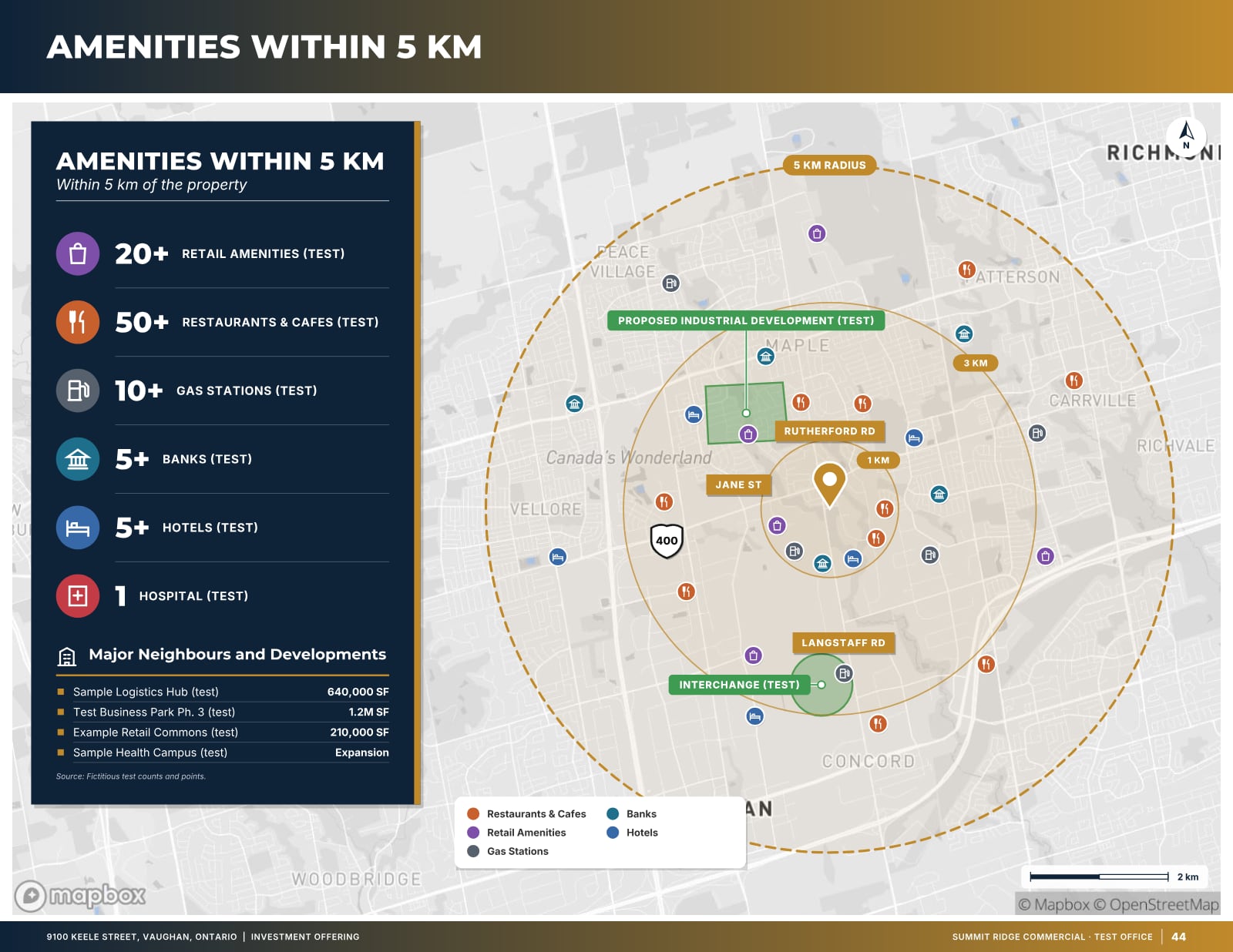
Sample pages are generated by the product from a fictitious test listing (9100 Keele Street, "Summit Ridge Commercial" test brand). Figures marked (test) are not real.
Related
Last updated 2026-10-14. General information for commercial real estate professionals, not legal advice.
Start with the fact sheet you already have.
Upload it, answer only what’s missing for the output you choose, and review a watermarked preview before you buy anything.